이전글에서는 문자열세팅까지 완료하였다.
이제는 웹과 정보를 주고 받기위해서 서버를 설치하고 세팅해 보도록 하겠다.
서버 세팅하기위해 우리가 사용할것은 Apache Tomcat 8.5 이다. 설치하기위해서
우선, https://tomcat.apache.org/download-80.cgi
Apache Tomcat® - Apache Tomcat 8 Software Downloads
Welcome to the Apache Tomcat® 8.x software download page. This page provides download links for obtaining the latest versions of Tomcat 8.x software, as well as links to the archives of older releases. Users of Tomcat 8.0.x should be aware that it has reac
tomcat.apache.org
사이트로 접속하여

빨간 박스안의 파일을 자신의 윈도우 환경에 맞춰 설치를 한다.
그 후

Windows -> Preferences -> Server-> Runtime Environment -> Add

우리가 설치해 놓은 Apache Tomcat v8.5 클릭 Next

Tomcat Installaion directory에서 압축을 풀어놓은 경로를 설정해준다. 그 후 Finish

우리가 설정해놓은 Interface에서 Servers를 보면 서버생성이 안되어있는데 클릭을하면 다음과 같은 창이 뜬다.
v8.5이므로 클릭 후 Finish하면 Servers 창에 Server name으로 지정해 놓은 서버가 생기면 더블클릭.
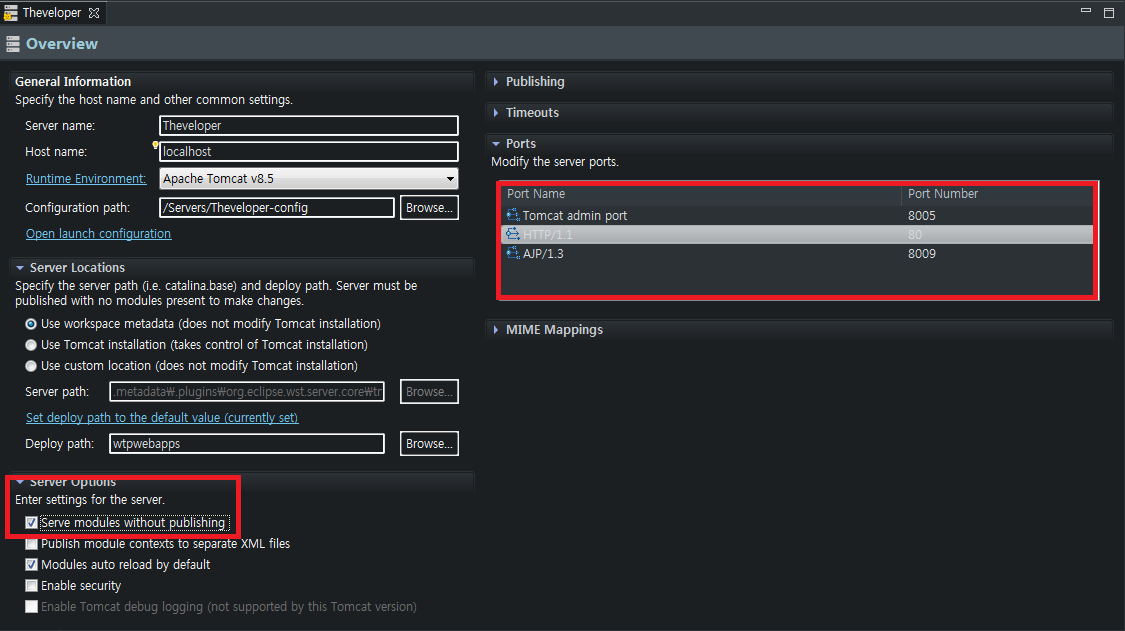
빨간박스 안의 Serve modules without publishing 체크
HTTP/1.1 -> Port Number의 8080을 -> 80으로 바꿔주고 Ctrl+S 눌러서 저장(*필수*)
'Settings > Eclipse' 카테고리의 다른 글
| [Java] Spring web.XML파일 설정 (0) | 2019.11.18 |
|---|---|
| [Java] Spring POM.XML파일 설정 (0) | 2019.11.18 |
| [Java] Eclipse부터 STS까지 세팅하기 - (4) Installation STS (0) | 2019.11.18 |
| [Java] Eclipse부터 STS까지 세팅하기 - (3) Maven Setting (0) | 2019.11.18 |
| [Java] Eclipse부터 STS까지 세팅하기 - (1) Windows Setting (0) | 2019.11.18 |


댓글